Edit your PDFs without leaving your DMS
Six PDF tools built into your DMS — accessible from the viewer, no download, no third-party application.
Espaces
Nouveauté
25.1
What is it for?
Pristy Espaces PDF editing tools are a set of document modification functions built into the PDF viewer — accessible directly on any PDF document in your DMS, without leaving Pristy and without a third-party application.
Reorder pages, split, merge, redact, annotate and sign your PDFs from a dedicated side panel. The result is saved as a new version in Pristy — the original is preserved, the modified file is immediately available to your team, versioned and accessible with the right permissions.
How to use it?
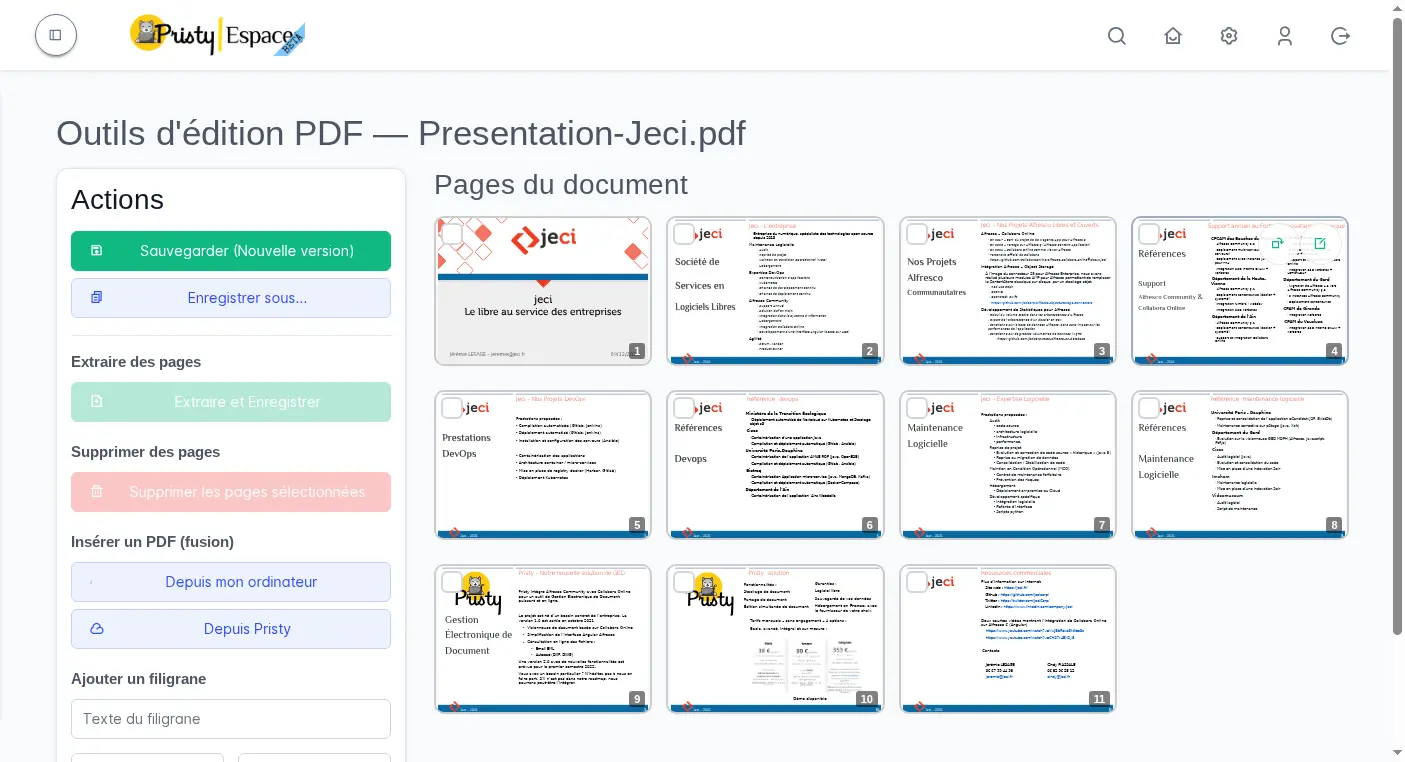
Open a PDF document in Pristy Espaces. The editing tools appear in the left side panel:
- Reorder pages — rearrange pages by drag and drop
- Split — extract a selection of pages into a new file
- Merge — insert a file from your computer or from Pristy
- Redact — permanently hide sensitive areas before distribution
- Highlight — annotate your PDF documents directly
- Sign — sign your documents without leaving your DMS
Save as a new version or use Save as to create a new file.
Redact, sign, split. Without leaving your DMS.
When should you use it?
Ideal for preparing documents for distribution: reorganising and splitting the pages of a report, merging several documents into a single file, redacting sensitive information or signing before sending.
A few concrete examples:
- GDPR — Redact sensitive or personal data from a document before distributing it, without downloading the file or using an external tool.
- Management / compliance — Sign official documents directly from the relevant space, or mask personal data before external distribution.
- Administration — Reorganise the pages of a scanned meeting record, extract deliberations by theme, all without a third-party tool.
Everything stays in Pristy — versioned, traceable, accessible with the right permissions.
How does it boost productivity?
No more back-and-forth between your DMS and an external PDF tool. Before: download the file, open a dedicated tool, edit, re-import, create a new version manually. Now: open the PDF in Pristy, edit from the side panel, save — the new version is immediately available.
Modifications happen where your documents already live, with no context switch, no risk of losing traceability. For teams that regularly process PDFs for distribution (redaction, signing, assembly), that is several minutes saved per document.
Frequently asked questions
Is the original file modified?
No. The result is always saved as a new version or via “Save as”. The original is preserved and remains accessible in the version history.
Is redaction permanent?
Yes. Redaction permanently hides the selected areas — the data is no longer recoverable in the resulting file. This is a permanent deletion, not just a visual mask.
Can files from other Pristy spaces be merged?
Yes. The merge feature allows you to insert a file from your computer or from any Pristy space you have access to.
Other recent features
- PDF consultation — Consultez vos pdfs facilement, qu'ils contiennent 2 ou 650 pages.
- Administration tools — Manage Alfresco data models, browse the repository and supervise your platform from Pristy Portail — no server access, no command line.
- Classification plan — Automatically structure your workspaces with the Pristy Espaces classification plan. Define document types and folder hierarchy — Pristy classifies on deposit, without interrupting activity.
- Customisable dashboard — Access what matters most from the moment you log in with the customisable dashboard in Pristy Portail. Profile-based home pages, configurable blocks, personalised by each user.
Planned developments for this feature
There is always room for improvement! Here is what we have planned for the future of this feature:
- Thumbnail navigation with breadcrumb in the PDF editor
- PDF form field saving
How to get Pristy
Order Pristy today and benefit from modern, intuitive document management
Pristy also includes Pristy Portal application that offers profile and user pages. Pristy Portail is included with the purchase of Pristy Actes and Pristy Espaces (solo or together). Pristy Portail can also be purchased on its own.
Go to our rates page to find out more. Request your quote now and take advantage of our low rates and the chance to give your opinion on future features!